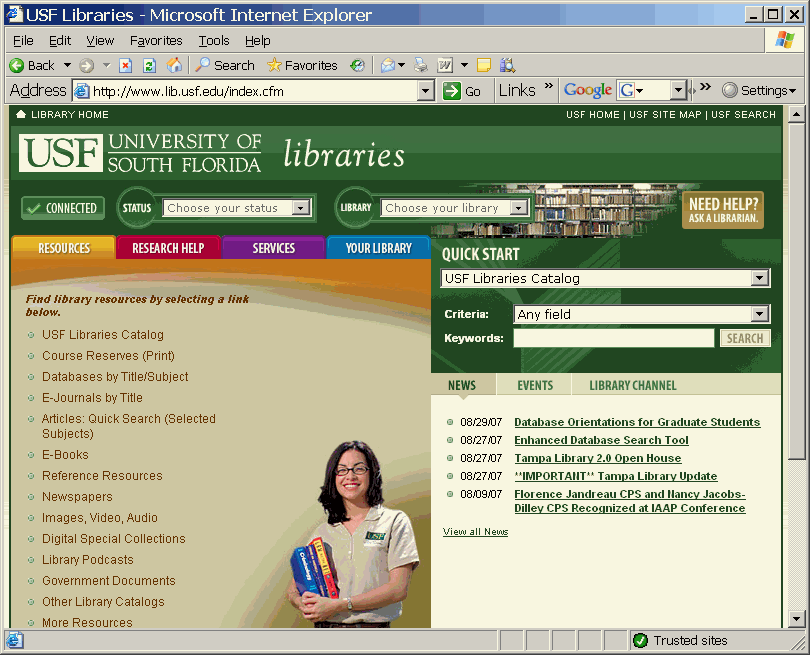
USF Libraries homepage USF Library Home Page
http://www.lib.usf.edu/
Library Catalog
The Catalog lists the
books, journals, videos, government documents, owned by the USF Libraries. Some
material is available electronically through the Library Catalog while some is
print only. USF
Library Catalog http://www.lib.usf.edu
Other catalogs
To find books in other libraries Other Library Catalogs http://www.lib.usf.edu/public/index.cfm?Pg=OtherLibraryCatalogs
Databases
Click on "databases" to use indexes & abstract services that will allow you to find articles in journals/magazines/etc. Databases by Category
Once in the
"databases" area, either type in the title of the database you wish
to use in the title box – or click on "by category" for
a list of suggested databases by broad categories. Databases cover subject
areas from the arts and humanities to physics and zoology. When you get to the
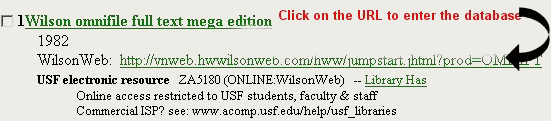
entry for the database, click the URL in order to enter the database and begin
searching. Here’s an example of an entry for "Wilson Omnifile", a multidisciplinary
database that covers a wide range of topic and includes online full text
articles:
Ejournals
Use the "ejournals" list to determine if the USF Libraries has access to online full text of the journal or article you need. When looking for journal titles, always double-check in the Library Catalog (WebLUIS) as well as under "ejournals." http://sfx.fcla.edu/usf/azlist/default
Try the "citation linker" if you have information on a specific article. It might work! Citation Linker
Citing sources
Information on various citation styles (APA, MLA, etc.) Citing Sources Help
Interlibrary
Library Loan
Use interlibrary loan to borrow books from other USF campuses. Use interlibrary loan to request the loan of articles and books beyond those owned by USF. Interlibrary Loan

SFX
Look for the SFX button
in the databases. SFX is a linking tool that will try to guide you to places that the USF Libraries can provide
access to articles, etc.
RefWorks
Licensed for use by everyone at USF, RefWorks is web-based bibliographic management software. Download and/or import citations and create bibliographies in MLA, APA, or many other citations styles with a click of a button. Use the Group Login Code for off-campus access: RWUSouthFlor and then create your own individual account. RefWorks
NEED HELP USING ANY OF
THE LIBRARIES’ RESOURCES?
YOU CAN CLICK "ASK-A-LIBRARIAN" AND SEND SOME EMAIL
OR CALL THE TAMPA LIBRARY
REFERENCE DESK
1-866-550-8036 (toll free)
or 813-974-2729 (press 1 to get a human being).
Joe Floyd,
974-9867 USF Library
Reference Department